by Bill H on February 4, 2010
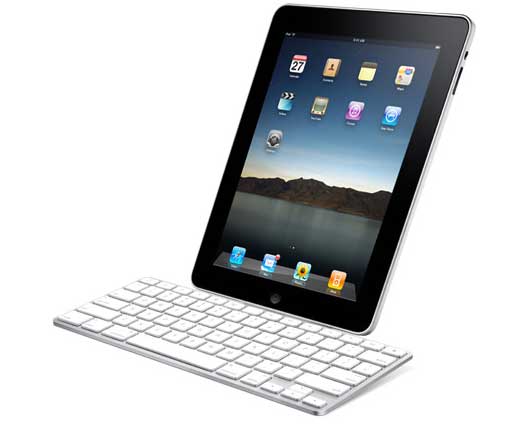
If you’re writing your novel on a Mac wouldn’t you’d love to be able to slip off to some dark, quiet coffeehouse, plug some music into your ears ,and write like crazy in a place so anonymous it surrounds you with invisible support?
But who wants to lug even a Macbook around all the time. And so far, the iPhone offers no keyboard alternative. E-e-hh, so you stay home.
It’s true there’s a hole in the Apple repertoire where a netbook should be–-and the iPad doesn’t really fill it. But footloose authors rejoice! [click to continue…]
by Bill H on February 1, 2010
Piles of Typed Manuscripts
“I have an old pile of typed manuscripts that were never saved on a computer. I want to find a scanner that can EASILY and EFFICIENTLY connect to my Macbook Pro, which will turn those old manuscripts into pdf files to be saved digitally. It would be even better if the scanner would save the files in a form that could be edited, but that’s less important than just getting them into digital form.”
Scan it to PDF
This part is easy, especially on a Mac. At BestBuy or wherever, request a scanner known to “see” text pretty well–but really, any of today’s scanners can credibly digitize your old stuff as an image file. Save your scan as a multi-page, high-quality image–a .tiff or a .psd. After the save, select it, click Print, and when the Print Menu comes up, look for a “Save as PDF” option (on any computer running OS X, it will always be there). Click on “Save as PDF” and you’re done.
PDF to MS Word – the OCR Dilemma
Here’s where it gets tricky. PDF is technically an image format, so turning it into editable text (a doc or docx file) is like cramming the square peg into a round hole. Because software for OCR (optical character recognition) costs a lot of money.
But happily shareware developers are coming up with cheaper solutions. In Windows, there are a variety of options. But for your MacBook Pro, running OS X, the pickin’s are slimmer. There’s an application called PDF OCR. I haven’t used it, but at $29.95 it’s certainly worth a try. Also: a web based service called PDF Converter with have various membership levels. Try out their $9/mo. level–you can cancel at any time.
For the Rich
I’ll mention, for the record, a couple of “Cadillac” OCR mentions. One is Adobe Acrobat (not Adobe Reader, mind you). It’ll cost you $449 (ouch!). The other is Final Draft.
For Playwrights
Final Draft can take over and do an excellent draft of giving you a formatted Final Draft file (.fdr) that you can “Save As” a Word doc or docx–keeping the original FD formatting. That’s pretty slick, and almost effortless–assuming you already own Final Draft or have $249 to drop.
The Winner
Probably the best solution of all, if you don’t mind learning how to use it, is OmniPage Pro X, even pricier, for the Mac, at $499. For Windows, Omnipage comes in the usual array of cheaper versions–from $49 to $149 and up–but even with the Windows limitation, Omnipage gets my vote for the software of choice. You’ll either have to own a Windows computer, know someone who does, or have Windows installed on a partition of your Mac’s hard drive, but compared to coughing up $449, the extra trouble may be worth it.
Background Note for Info Nerds
OCR, being a form of object recognition, is one of the toughest challenges a computer can face. The slightest typographical irregularity can make a scan spin off into irregularity–old newsprint is an absolute nightmare. This is why you should try to start with a totally clean print job (use a lazer printer, if possible) and a non-Seraph font.
Happily, the folks at Google, who want to digitize every text on the face of the earth, are deeply into research on this as we sleep, so you can expect OCR to improve noticeably over the next few years.
For playwrights using Final Draft, the key is getting a good PDF file. At that point, Final Draft can take over and do an excellent draft of giving you a formatted Final Draft file (.fdr). Once you have that, you can “Save As” a Word doc or docx–and keep the formatting. That’s another ideal solution–assuming you have $249 to drop on Final Draft.
by Bill H on January 29, 2010
Apple's new iPad
The Apple iPad arrived Wednesday and elicited mostly positive reviews, but many were an interesting combination of dying-to-have-one but loathe-to-show-it.
I haven’t put my hands on one yet–and doubt I’d ever use it as a writing tool–but having read through most of the response online and in the tech press, my feeling is that, though it’s a delicious, innovative delight — and will only get more so as new features are added — the Messiah only comes once.
The collective voice of the industry raised hosannas one time to the advent of the iPod, then again a bit reluctantly to the iPhone, but you just can’t expect them to fall on their knees a third time.
The good news is that time is on the iPad’s side [click to continue…]